How to Reverse Engineer AI Overviews
To reverse engineer AI Overviews, check the exact question your customers ask and see which pages Google’s AI Overviews (and AI Mode, ChatGPT, Gemini and Perplexity) cite for it, plus the fan-out and People Also Ask questions behind the answer. Then publish genuinely useful answers on the kinds of sites those AIs already cite, link back to your own answer-first page, and track the question on a schedule until you appear. Here’s the five-step method we use in RankResults, with real data from checking this exact question.
Peter Drew is a digital marketer and software creator who has worked in SEO since 1995. He created BruteForceSEO and builds the Rank family of tools, including RankResults.

Video transcript
Why reverse engineer AI Overviews?
When someone asks Google a question today, the first thing they often see isn’t a list of links. It’s an AI Overview: a written answer, with a handful of sources underneath. Google’s AI Mode, ChatGPT, Gemini and Perplexity all work the same way.
So how do you become one of those sources? You don’t guess. You reverse engineer it. You look at exactly what the AI already cites for the question you care about, and you work backwards.
I’m Peter Drew. I’ve been doing SEO since 1995. In this guide I’ll walk you through the five-step method, using RankResults for every step, with real data from a check we ran on this very question: how to reverse engineer AI Overviews.
Step 1: Run an AI visibility check on your question
Step one. Start with the exact question your customers ask, word for word, the way a person would type it or say it.
In RankResults, put that question into an AI visibility check. Choose the country or city your customers are in, and tell it who should appear: your business name and your website.
All five AI surfaces at once
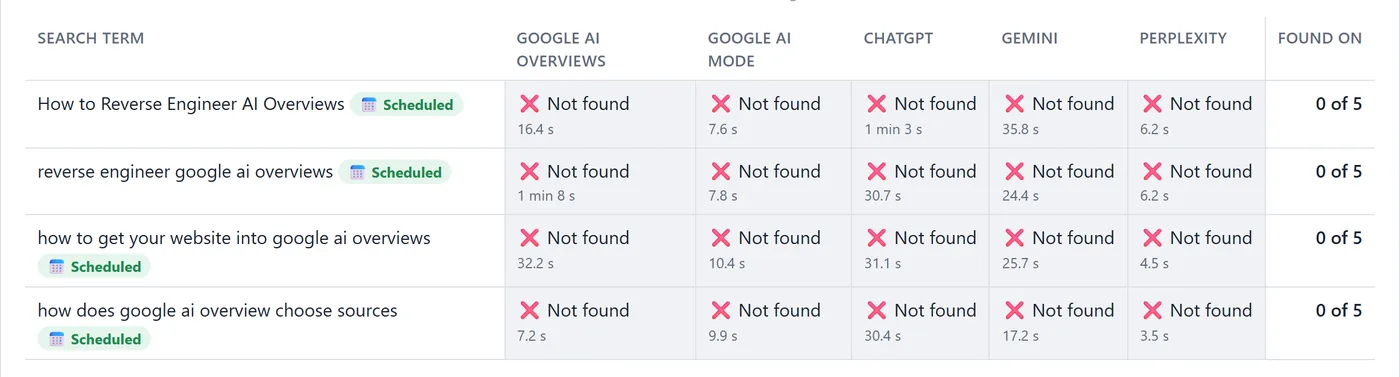
RankResults asks all five AI surfaces at once: Google AI Overviews, Google AI Mode, ChatGPT, Gemini and Perplexity. We checked four versions of our question across the whole United States. Four questions, five AIs, twenty answers.
Proof for every answer
Every result comes with proof. Click any cell to see the full AI answer and every source it cited, and when you’re found, RankResults keeps a screenshot of the answer as proof.
Our own site? Not found on any of the five. That’s our honest starting point, and it’s probably yours too.
Step 2: See exactly what AI cites, and what it’s searching for
Step two is where the reverse engineering really happens.
Citations: the exact sources
Open Citations. It lists the exact pages and websites the AI pulled its answers from, how often each was cited, and on which AI surfaces. Across our twenty answers, AI cited sixty-three different websites, ninety-five times.
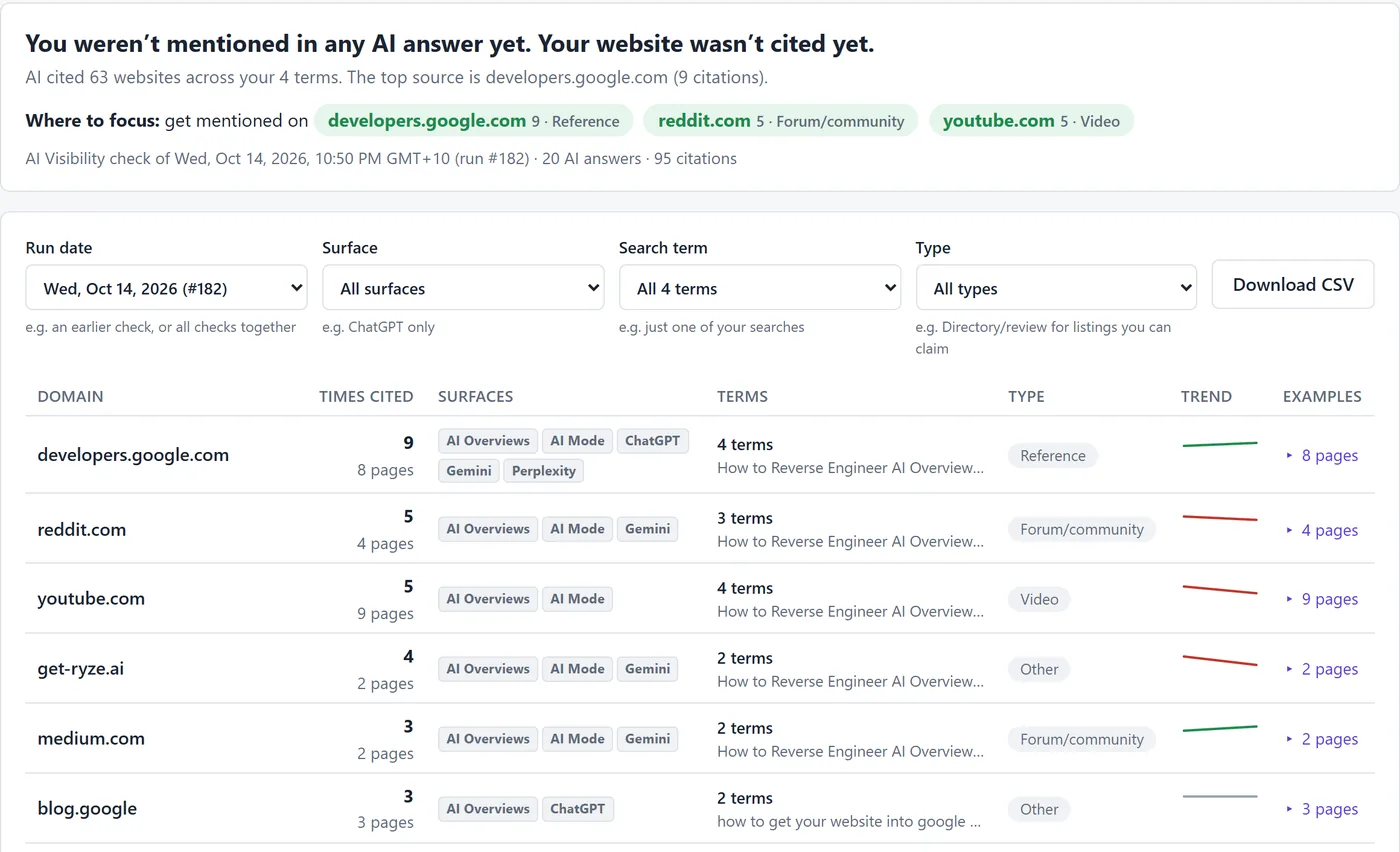
A pattern jumps out. One official reference source was cited by every AI, for every question. A few community and video platforms were cited by several AIs. And then there’s a long tail of blogs, each cited just once. That long tail tells you the AI hasn’t settled on a favourite. There’s room for you.
Questions: fan-out, People Also Ask, related and autocomplete
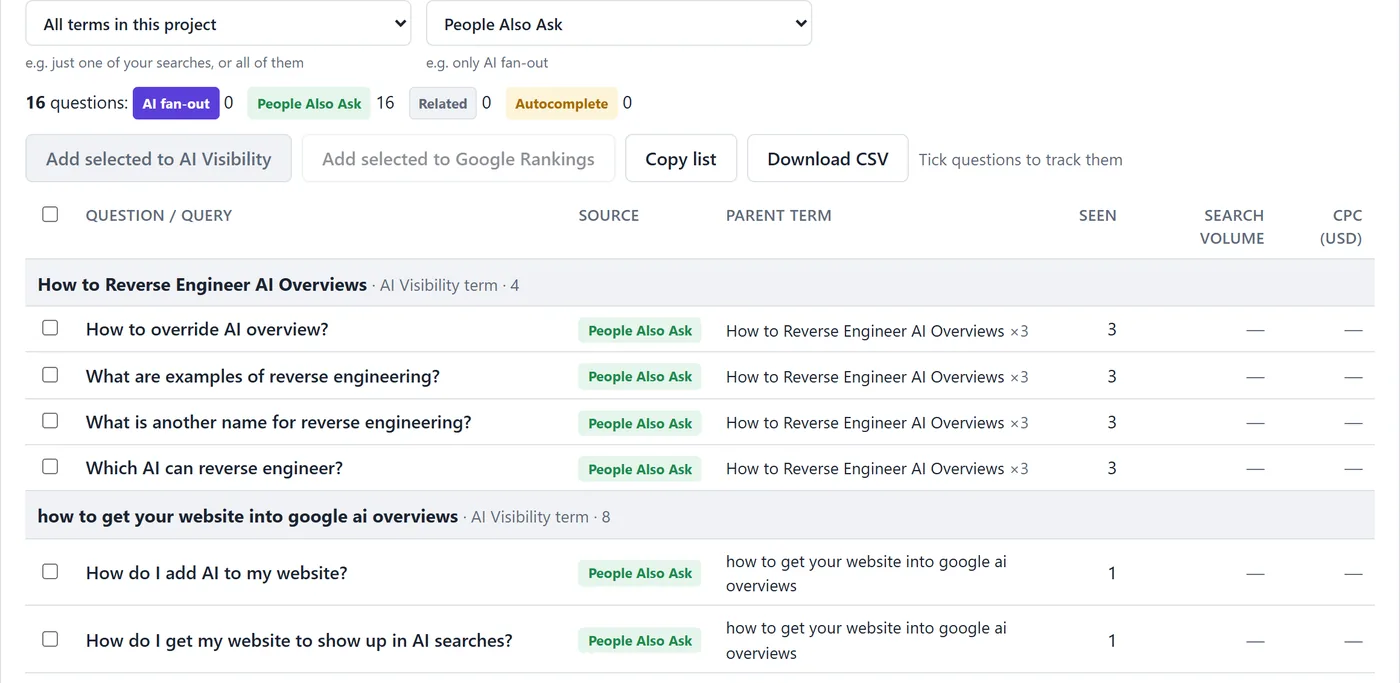
Next, open Questions. RankResults collects the AI fan-out queries, the searches the AI quietly runs behind the scenes, along with People Also Ask, related searches and autocomplete. For our topic that’s sixty-eight questions so far, like “What sources does AI Overview use?” and “How does Google AI Overview get its information?” This is your outline. It’s exactly what your page must answer.
Share of Voice and Volume & CPC
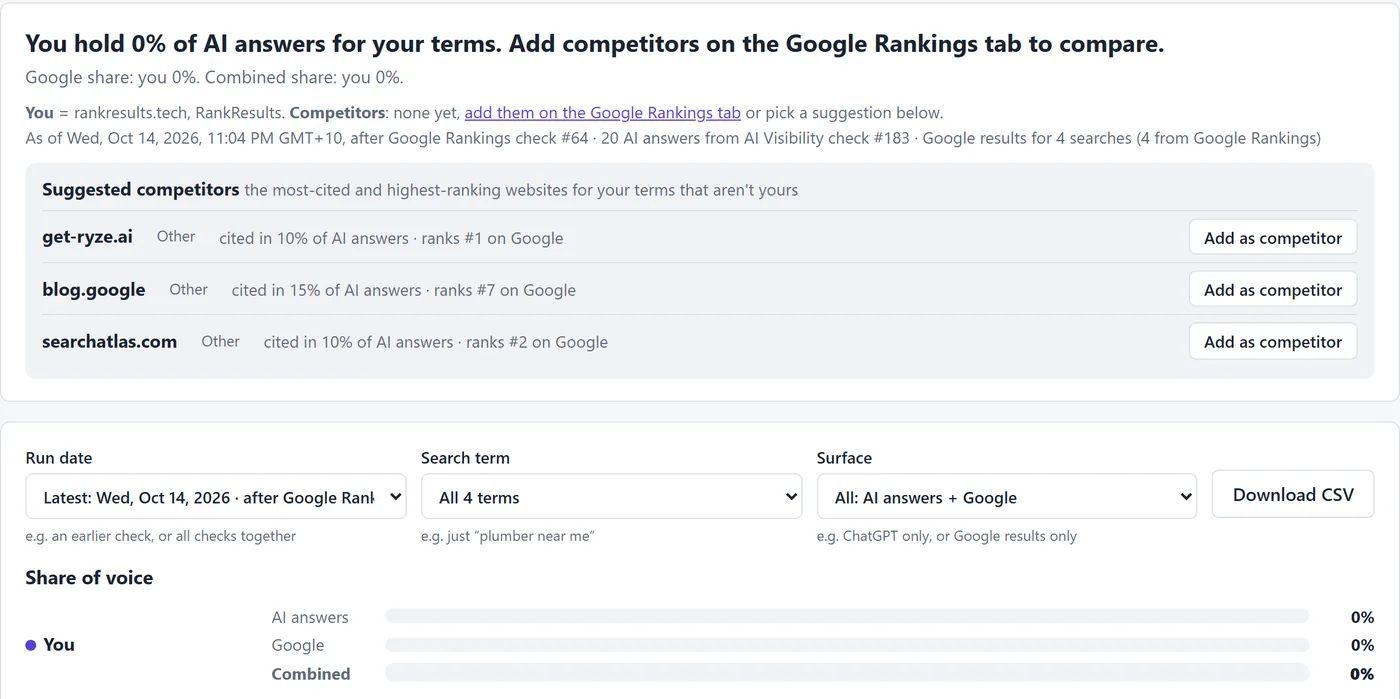
Then check Share of Voice, to see how much of the AI conversation each website owns compared with your competitors. And use Volume and CPC to see which of those questions people search most, and what a click on them is worth. Ours show very little Google volume, which is normal for long questions, and long questions are exactly what AI answers are built from.
Step 3: Pick the sites to publish on
Step three: choose where your content should live.
Where to focus
Go back to Citations and look at its “Where to focus” line. RankResults picks out the most-cited sites for you. You can filter by type, too: forums and communities, video, reference, news.
You’re looking for host sites cited by more than one AI, for more than one of your questions, and where you can actually publish. Some of the most-cited sites are open platforms, where anyone with something genuinely useful to say can post an article, an answer or a video. Shortlist three to five.
Why one page is cited and another isn’t
Not sure why one page gets cited and another doesn’t? Run a free RankScore audit. It’s offered right inside your results, and it shows how ready a page is for AI, so you can compare the pages that win with your own.

Step 4: Publish genuinely useful content there
Step four. Publish genuinely useful content on those kinds of sites, and link back to your own page.
Answer the questions the AI is searching for
Useful is the key word. Don’t post an advert. Use the fan-out queries and People Also Ask questions from step two as your outline, answer them clearly, and put the answer first. Plain headings, real examples, real numbers.
Link back to an answer-first page
Then, in a natural place, link back to the full page on your own website: the page you want the AI to cite. Make that page answer-first as well, with the question as its heading and the short answer straight underneath. This page is built exactly that way.
While you work, the free RankResults Lens extension for Chrome shows whether you’re cited each time you search Google, ChatGPT or Perplexity, and checks any website’s AI readiness in one click.
Step 5: Schedule tracking and watch for the day you appear
Step five. Schedule tracking, and watch for the day you appear.
Check on a schedule
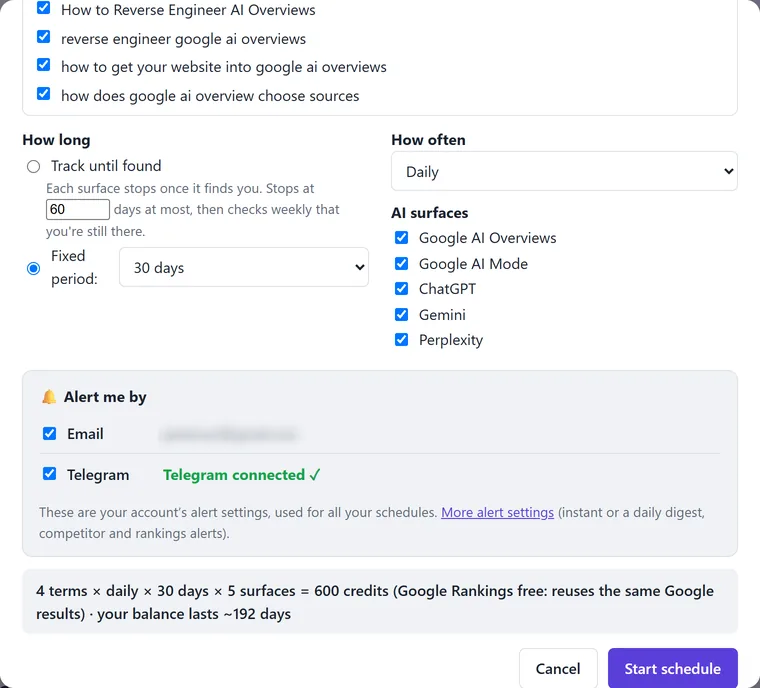
AI answers are written fresh every time, so the sources keep moving. One check is a snapshot; a schedule shows the trend. Set your questions to check daily for thirty days, and RankResults runs them for you and keeps the history.
Alerts, reports and share cards
Turn on alerts, and the moment you appear, or drop out, you get a message by email or on Telegram. You’ll see exactly when a new site starts getting cited, and the day your own site shows up.
When it does, you have proof. Download a PDF report of every answer and citation, or share a result card, which is handy if you’re doing this for clients.
The method in brief
So that’s the method. One: run an AI visibility check on your question. Two: see what AI cites, and the questions it’s searching for. Three: pick the sites to publish on. Four: publish genuinely useful content there, linking back to your own page. Five: schedule tracking, and watch for the day you appear.
We’re following these exact steps for this question right now, starting from zero out of five.
RankResults is free to join, with one hundred credits to start, so you can try every step on your own questions. You’ll find it at rankresults.tech. Thanks for watching.
Questions people ask
What sources does AI Overview use?
Pages from Google’s search index, linked under the answer. In our check of four questions about reverse engineering AI Overviews (United States, Wed 14 October 2026), the five AI surfaces cited 63 different websites: an official Google reference was cited by every one of them, followed by community and video sites and a long tail of blogs cited once each.
How does Google AI Overview get its information?
It writes the answer from pages in Google’s index. Behind the scenes it often runs several related searches (called query fan-out) to cover the question, then links some of the pages it used as sources. That’s why the fan-out queries are worth answering on your own page.
Can you reverse engineer AI Overviews?
Yes, from the outside: you can see exactly which pages an AI Overview cites for a question, which related questions it searches, and how that changes over time. You can’t see Google’s internal systems, so the method is to study what gets cited and become a source of the same kind.
How do I get my website to show up in AI searches?
Make sure your page is indexed and answers the question directly, answer first. Then earn genuine mentions on the kinds of sites the AI already cites for that question, linking back to your page, and check on a schedule to see when you appear.
Is Google AI Overview a reliable source?
It’s a useful summary, but it can be incomplete or out of date, so check the sources it links. For a business, that’s one more reason to make sure the pages it cites describe you accurately.
How to override AI overview?
You can’t edit an AI Overview directly. To change what it says on your topic, change what it reads: publish clear, accurate answers on your own page and on the sites it already cites, then track the question to see when the answer changes.
Why is Google AI Overview not showing up?
Google only shows an AI Overview for some searches, and not in every country or language, so for many questions there isn’t one at all. RankResults records that as “no AI answer” for that surface, and AI Mode, ChatGPT, Gemini and Perplexity may still answer.
